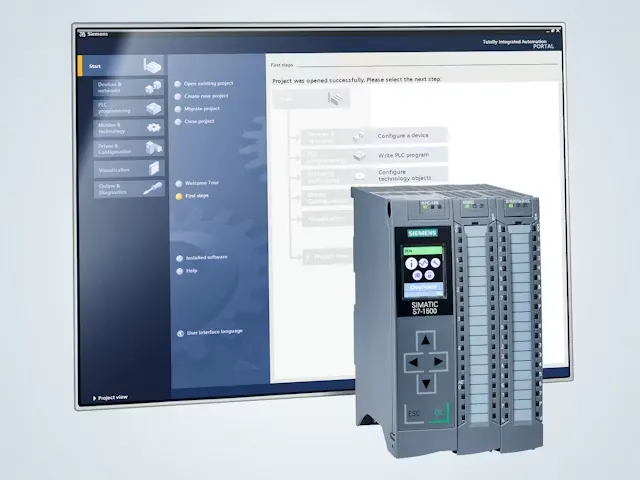
TIA Portal is Siemens' engineering software for industrial automation.
It is used to configure, program, test and diagnose Siemens automation systems. For learners, engineers and maintenance teams, TIA Portal is where the PLC project comes together: the hardware, the logic, the HMI screens, the network settings and the diagnostic tools.
Real-world example
Think of a PLC training system.
You can use TIA Portal to add the PLC, configure its inputs and outputs, write a Ladder Logic program, build HMI buttons and indicators, download the project to hardware and then monitor what the system is doing live.
What the name means
TIA stands for Totally Integrated Automation.
The name matters because TIA Portal is designed around integration. Instead of treating PLC programming, HMI design, hardware configuration and diagnostics as completely separate tasks, Siemens brings those engineering activities into a shared project environment.
That does not mean every Siemens product is the same, or that every task is automatic. It means the project structure is joined up. The PLC, HMI, I/O devices, networks and diagnostics can be managed in a more consistent way, which helps reduce duplicated work and makes projects easier to understand.
What it is used for
TIA Portal connects the main engineering tasks behind a Siemens control system.
For a beginner, the easiest way to understand TIA Portal is to look at the jobs it helps you do. It is not just a code editor. It is the place where automation hardware and software are built into a working project.
01
Configure PLC hardware
Add the CPU, signal boards, I/O modules and communication settings so the software project matches the industry-standard automation hardware.
02
Write PLC programs
Create the logic that controls machines using languages such as Ladder Logic, Function Block Diagram and Structured Control Language.
03
Create HMI screens
Build operator screens for buttons, indicators, alarms, values and machine status using WinCC within the TIA Portal environment.
04
Set up networks
Configure communication between PLCs, HMIs, distributed I/O and other devices so the system can exchange data correctly.
05
Download and test
Transfer the project to the PLC or HMI, then check that the real system behaves as expected.
06
Diagnose faults
Use online monitoring, diagnostics and trace tools to understand faults, check signals and improve commissioning.
STEP 7 explained
STEP 7 is the PLC engineering part of TIA Portal.
This is a common point of confusion. Beginners often hear people say “TIA Portal” and “STEP 7” as if they are exactly the same thing. They are closely connected, but they are not quite the same.
TIA Portal is the wider Siemens engineering platform. SIMATIC STEP 7 is the engineering software inside TIA Portal used to configure, program, test and diagnose SIMATIC controllers. Siemens describes STEP 7 as engineering software for configuring and programming SIMATIC controllers, with integrated diagnostics and commissioning support.
SIMATIC STEP 7 is the PLC engineering component within the wider TIA Portal environment.
For simple PLC work, STEP 7 is the part most learners interact with first. When an HMI is added, WinCC becomes important too. When drives, safety or larger networks are involved, other parts of the TIA Portal ecosystem may come into play.
Programming languages
TIA Portal supports common PLC programming languages.
Inside STEP 7, engineers can program PLC logic using different languages depending on the job, the site standard and the people who will maintain the system. Siemens highlights graphical LAD and FBD editors for clear navigation in the block editor.
LAD
Ladder Logic
A visual language based on relay-style contacts and coils. It is widely used for discrete machine control and is easy to monitor during fault finding.
FBD
Function Block Diagram
A graphical language that connects blocks together. It is useful for signal flow, reusable functions and certain process-style control tasks.
SCL
Structured Control Language
A text-based Siemens language useful for calculations, data handling, loops and more complex logic where text is clearer than rungs.
The right language depends on the application. A simple motor start circuit may be easiest in Ladder Logic, while a calculation-heavy routine may be clearer in SCL.
Typical workflow
A TIA Portal project usually follows a practical build-and-test flow.
Every project is different, but the core workflow is easy to understand. Engineers build the project in software, connect it to physical equipment, then test and refine the system until it behaves correctly.
01
Create the project
Start a new project and choose the required Siemens devices.
02
Configure hardware
Add the PLC, I/O, HMI and network settings so the project matches the physical setup.
03
Write the program
Create logic blocks, tags and control routines for the machine or training system.
04
Build the HMI
Create screens, buttons, indicators, alarms and values for the operator interface.
05
Download and test
Transfer the project to the PLC and HMI, then check inputs, outputs, logic and screen behaviour.
06
Diagnose and improve
Use online monitoring and diagnostics to find issues, prove changes and make the system more reliable.
Where it fits
TIA Portal is used with Siemens SIMATIC automation systems.
TIA Portal is commonly associated with SIMATIC controllers such as S7-1200 and S7-1500 PLCs, as well as distributed I/O, HMI panels and wider Siemens automation hardware. Siemens states that STEP 7 Professional can be used to configure, program, test and diagnose all generations of SIMATIC controllers, while STEP 7 Basic is a price-optimised subset of STEP 7 Professional.
The value is not just programming. It is joined-up engineering.
A PLC program is only one part of an automation system. Engineers also need the correct hardware setup, clear tags, communication settings, HMI links, diagnostics and documentation. TIA Portal helps bring those pieces together in one place.
For learners, this is useful because it shows the full relationship between software and hardware. A tag used in the PLC can be linked to an HMI screen. A digital input can be monitored live. A fault can be diagnosed from the same project environment. That is where automation starts to feel real.
Practical takeaway
TIA Portal is where the control system becomes a project.
It gives engineers a structured way to build, test and support Siemens automation systems, from the PLC logic through to the operator interface.
Modern Siemens engineering
TIA Portal is the modern engineering environment for Siemens automation.
Older Siemens systems were often engineered using separate or earlier tools, such as classic STEP 7 / SIMATIC Manager for many S7-300 and S7-400 projects. TIA Portal brought Siemens automation engineering into a more integrated environment, especially for modern platforms such as S7-1200 and S7-1500.
In real factories, you may still see older Siemens software because machines can stay in service for many years. But for modern Siemens PLC and HMI learning, TIA Portal is the key platform to understand.
Common misconceptions
TIA Portal is often misunderstood by beginners.
“TIA Portal is a PLC.”
TIA Portal is not a PLC. It is engineering software used to configure, program and diagnose Siemens automation systems.
“STEP 7 and TIA Portal are exactly the same.”
STEP 7 is the PLC engineering software within TIA Portal. TIA Portal is the wider platform that can also include HMI engineering, safety, drives and other automation tools.
“You only need software to understand automation.”
Software is important, but real confidence grows when learners connect the project to physical inputs, outputs, wiring, HMIs and live fault-finding tasks.
Frequently asked questions
TIA Portal FAQs
What is TIA Portal?
TIA Portal is Siemens' integrated engineering environment for configuring, programming, testing and diagnosing industrial automation systems, including PLCs and HMIs.
What does TIA stand for?
TIA stands for Totally Integrated Automation. It describes Siemens' approach of bringing automation engineering tasks together in a shared software environment.
What is STEP 7 in TIA Portal?
SIMATIC STEP 7 is the PLC engineering software inside TIA Portal. It is used to configure, program, test and diagnose SIMATIC controllers.
Does TIA Portal program HMIs?
Yes. HMI engineering is handled through WinCC within the TIA Portal environment, allowing PLC and HMI development to sit together in the same project structure.
Can beginners learn TIA Portal?
Yes. Beginners can learn the core workflow step by step, especially when they connect the software to physical PLC hardware and simple input/output tasks.
What PLCs work with TIA Portal?
TIA Portal is commonly used with Siemens SIMATIC PLCs such as S7-1200 and S7-1500 controllers, along with distributed I/O, HMI panels and related Siemens automation hardware.
Is TIA Portal used in industry?
Yes. TIA Portal is widely used with Siemens SIMATIC automation systems in industrial environments such as manufacturing, machine building, process industries and training settings.
Evidence base
Sources used for this article.
This guide uses Siemens product information and technical descriptions to keep the explanation accurate and grounded.