
TIA Portal in plain English
TIA Portal stands for Totally Integrated Automation Portal. In simple terms, it is the Siemens software environment used to create, configure and manage automation projects.
For a beginner using a Siemens S7-1200 PLC, TIA Portal is where you build the project, add the PLC, create your tags, write ladder logic, configure the HMI and download the program.
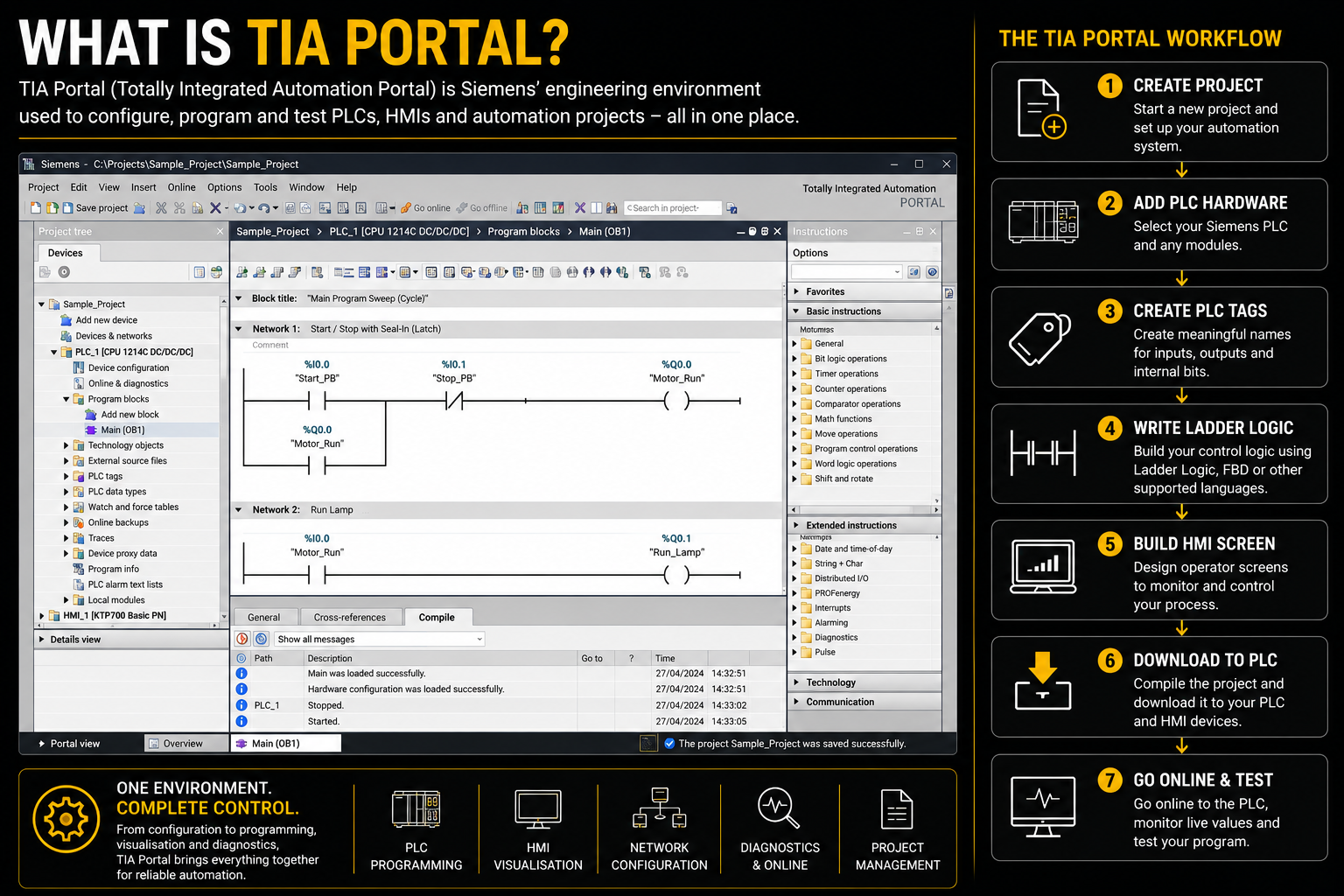
What is TIA Portal used for?
TIA Portal helps you move from an empty automation project to a working PLC and HMI system.
Where does STEP 7 fit in?
STEP 7 is the Siemens engineering software used inside TIA Portal for configuring and programming SIMATIC PLCs. For S7-1200 training, STEP 7 Basic is usually the more suitable software route than the full STEP 7 Professional package.
Put simply: TIA Portal is the wider engineering environment, and STEP 7 is the part used for PLC configuration and programming.
For colleges, employers and serious learners, the correct licence route should always be checked through Siemens or an approved distributor.
How a basic TIA Portal project works
A beginner project follows a simple flow. The names and screens can feel intimidating at first, but the process soon starts to make sense.
Create a project
Start with a clean project file for your PLC and HMI work.
Add hardware
Select the correct Siemens S7-1200 CPU and configure the device.
Create tags
Name your inputs, outputs and internal bits clearly.
Write logic
Build your ladder logic, test the sequence and compile the program.
Download and test
Send the project to the PLC, go online and check the real hardware response.
Download to PLC vs upload from PLC
In TIA Portal, download means sending your project from the computer to the PLC or HMI. Upload means bringing data back from the device into your project.
For beginners, the key phrase to remember is: you usually download to the PLC when you want your real hardware to run the program you created.
What should a learner focus on first?
TIA Portal can do a lot, but beginners do not need to learn everything at once. Start with the core tools that make a basic PLC project work.
Common beginner mistakes
Most TIA Portal beginner problems come from setup, addressing and download steps rather than the idea of PLC logic itself.
Watch out for selecting the wrong PLC model, using messy tag names, forgetting to compile, and not going online to test live values.
Why real kit helps
TIA Portal becomes easier to understand when it is connected to real hardware. A tag is no longer just a name on a screen. It becomes a real pushbutton, lamp, selector switch, HMI button or input signal.
That is why Rising Edge training kits are designed around real industrial interaction. Learners can write logic, download it, press a real device and see the result.