
STEP 7 in plain English
STEP 7 is Siemens engineering software used to configure and program SIMATIC PLCs and automation controllers. In current Siemens workflows, beginners usually meet STEP 7 as part of TIA Portal.
The easiest way to understand it is this: TIA Portal is the full engineering workspace, and STEP 7 is the PLC configuration and programming toolset inside that workspace.
TIA Portal vs STEP 7
TIA Portal stands for Totally Integrated Automation Portal. It brings multiple Siemens automation engineering tasks into one project environment, so PLC programming, HMI work, diagnostics and related project tools can sit together.
STEP 7 Basic vs STEP 7 Professional
Siemens offers STEP 7 in different packages. STEP 7 Professional is the wider package for configuring, programming, testing and diagnosing SIMATIC controllers. STEP 7 Basic is a price-optimised subset of STEP 7 Professional.
For beginner S7-1200 learning, STEP 7 Basic is often the relevant starting point. Training providers and learners should still check the exact software package, version and licence route against the PLC hardware they plan to use.
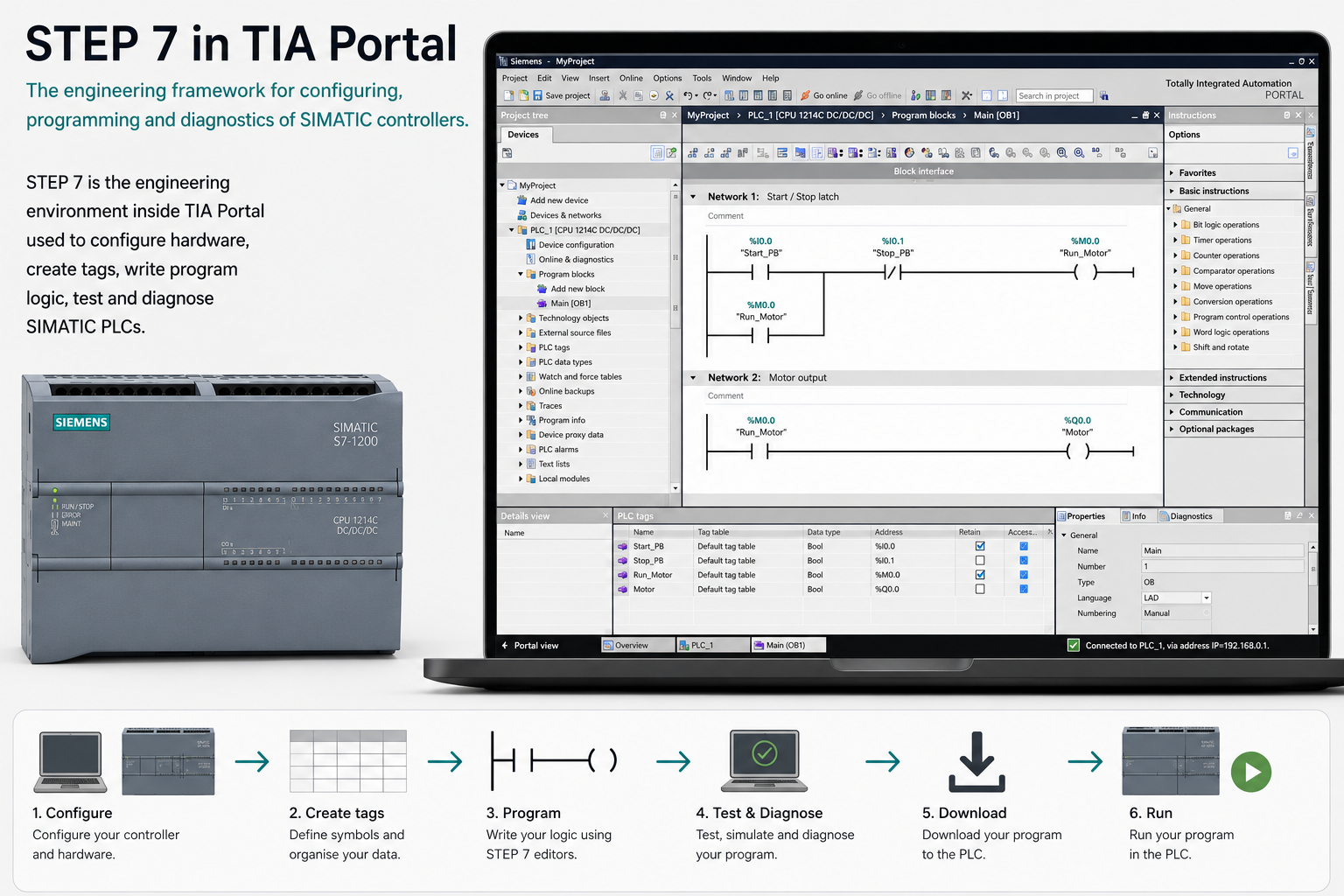
What is STEP 7 used for?
STEP 7 helps turn a blank Siemens PLC project into a working controller that can read inputs, run logic, diagnose faults and control outputs.
Configure hardware
Select the correct SIMATIC PLC, modules and device settings.
Create tags
Name inputs, outputs and internal values clearly.
Write logic
Create PLC program blocks using editors such as ladder logic and function block diagram.
Diagnose and test
Use online tools and diagnostics to check behaviour and troubleshoot issues.
Download to the PLC
Send the project to the controller and test it with real hardware.
Why STEP 7 matters for S7-1200 learning
The Siemens S7-1200 is a common compact PLC platform for beginner automation learning. STEP 7 is the software toolset used inside TIA Portal to configure and program Siemens PLC hardware such as the S7-1200.
Once learners understand the link between hardware configuration, tags, program blocks, diagnostics and downloads, the software becomes much easier to navigate.
Licence note for learners and training providers
Siemens software licensing can vary depending on version, region, education status and product package. Colleges, employers and serious learners should always check the correct licence route through Siemens or an approved distributor.
The important beginner point is simple: match the STEP 7 package to the SIMATIC PLC hardware and learning goals you are working with.
What should you learn next?
After STEP 7, the next useful topic is PLC tags. Tags turn raw addresses into readable names, which makes programs easier to build, teach and troubleshoot.
How STEP 7 fits into the Siemens workflow
STEP 7 is the PLC programming part of the Siemens engineering workflow. Inside TIA Portal, it is used to create the PLC project, configure devices, create tags, write program blocks, download to the controller and monitor code online.
For a beginner, STEP 7 becomes the main place where the control logic is built. You will spend time in PLC tags, Main OB1, program blocks and online diagnostics. HMI design sits alongside this in the wider TIA Portal environment.
The important thing is not just learning which button to click. It is understanding the workflow: configure the hardware, name the signals, write small sections of logic, download carefully, test online and document what the program is doing.
Common beginner mistakes
- Mixing up TIA Portal and STEP 7. TIA Portal is the full environment; STEP 7 is the PLC programming part inside it.
- Writing logic before setting up the PLC hardware properly. The project needs the correct controller and IO configuration first.
- Ignoring online monitoring. Watching live logic is one of the best ways to understand what the PLC is actually doing.
- Using memory bits without clear names or comments. This makes troubleshooting much harder later.
Frequently asked questions
What is STEP 7 used for?
STEP 7 is used to configure and program Siemens PLCs inside TIA Portal. It is where you create tags, write logic, organise program blocks and download to the PLC.
Is STEP 7 separate from TIA Portal?
Modern STEP 7 is part of TIA Portal. Older Siemens systems used STEP 7 as a separate software package, but current S7-1200 and S7-1500 workflows are usually handled in TIA Portal.
Can STEP 7 program an S7-1200 PLC?
Yes. Siemens S7-1200 PLCs are programmed using STEP 7 inside TIA Portal.
What languages can you use in STEP 7?
Common Siemens programming languages include Ladder Diagram, Function Block Diagram and Structured Text, known in Siemens as SCL.
Is STEP 7 suitable for beginners?
Yes, if you start with simple projects. Beginners should learn hardware configuration, PLC tags, basic ladder logic, downloading, online monitoring and simple fault finding first.
What is the difference between STEP 7 and WinCC?
STEP 7 is used for PLC programming. WinCC is used for HMI screens, buttons, alarms and operator interfaces inside TIA Portal.