
What is a PLC counter?
A PLC counter is a programming instruction used to count events. In a beginner project, that event might be a pushbutton press. In industry, it might be a sensor detecting a product, a machine completing a cycle, or a reject gate operating.
A counter usually has a current value, a preset value and status bits. The current value changes when the counter receives a valid count signal. When the current value reaches the preset, the counter done condition can be used elsewhere in the program.
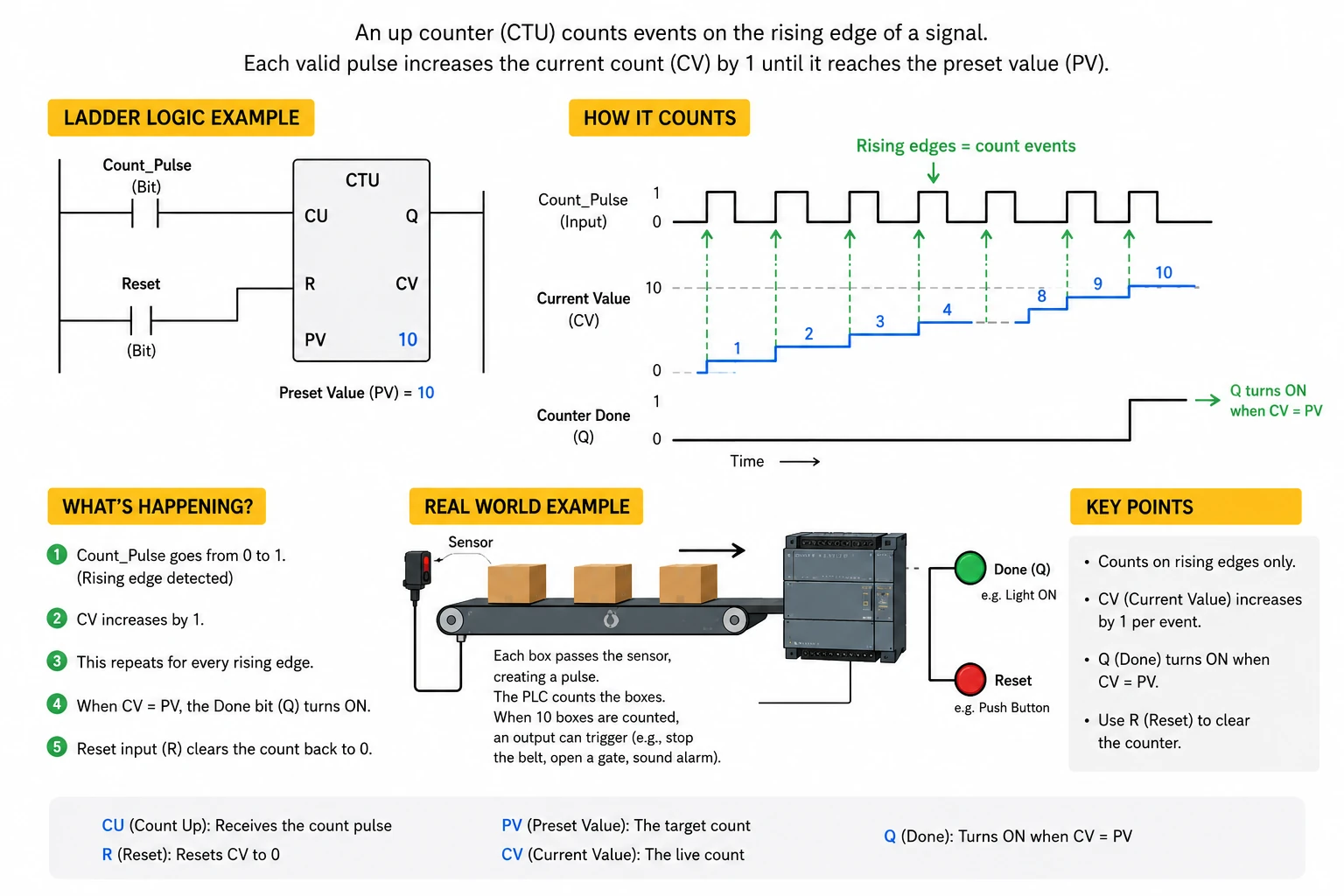
CTU: count up
A CTU counter counts upwards. Each valid rising event increases the current count. When the count reaches the preset, the done condition becomes true.
Example: count ten bottles passing a sensor. When the counter reaches ten, the PLC can turn on a lamp, stop a conveyor, or move to the next part of a sequence.
CTD: count down
A CTD counter counts downwards. It is useful where a process starts with a known quantity and needs to reduce the value as events happen.
Example: a batch may start with a target quantity of twenty parts. Each detected part reduces the remaining count until the batch is complete.
Why counter reset logic matters
Counters need clear reset logic. Without a reset, the counter may stay at its previous value and confuse the next cycle. Reset might come from an operator button, a completed batch, a machine mode change, or a new recipe starting.
Good counter logic makes it obvious what causes the count to increase, what causes it to decrease, and what resets it. This is especially important when faults, stops and manual operation are possible.
Why edge detection matters
A PLC should normally count an event once, not every scan while a sensor is blocked. If a sensor stays on for half a second, the PLC may scan the program many times during that half second. The counter logic must be arranged so the count happens on the event, not continuously while the signal remains true.
Many PLC platforms provide counter instructions that react to signal transitions, but learners still need to understand the idea: count the change, not the whole duration.
Common beginner counter mistakes
Common beginner mistakes
- Counting a signal for every PLC scan instead of counting each real event once.
- Forgetting to reset the counter before the next batch or exercise.
- Using a pushbutton as a count input without considering contact bounce or repeated presses.
- Not thinking about what should happen if the machine stops halfway through a count.
Frequently asked questions
What does a PLC counter do?
A PLC counter counts events and lets the program react when the count reaches a target value.
What is CTU in PLC programming?
CTU normally means count up. The count value increases when the counter receives a valid count event.
What is CTD in PLC programming?
CTD normally means count down. The count value decreases when the counter receives a valid count event.
Why does my counter count too many times?
The logic may be counting every PLC scan while the input is true rather than counting one clean event or transition.
When should a PLC counter be reset?
A counter should be reset when the process needs a fresh count, such as a new batch, a completed sequence or an operator reset.