
What is a PLC timer?
A PLC timer is a programming instruction used to measure time inside the PLC program. It does not usually create time by itself like a physical clock on a panel. Instead, the PLC executes the instruction during its normal scan cycle and updates the timer value while the required condition is true.
Timers are used when an output should not change immediately. They are common in start-up delays, alarm delays, conveyor gaps, pump run-on sequences, traffic-light style exercises and machine reset routines.
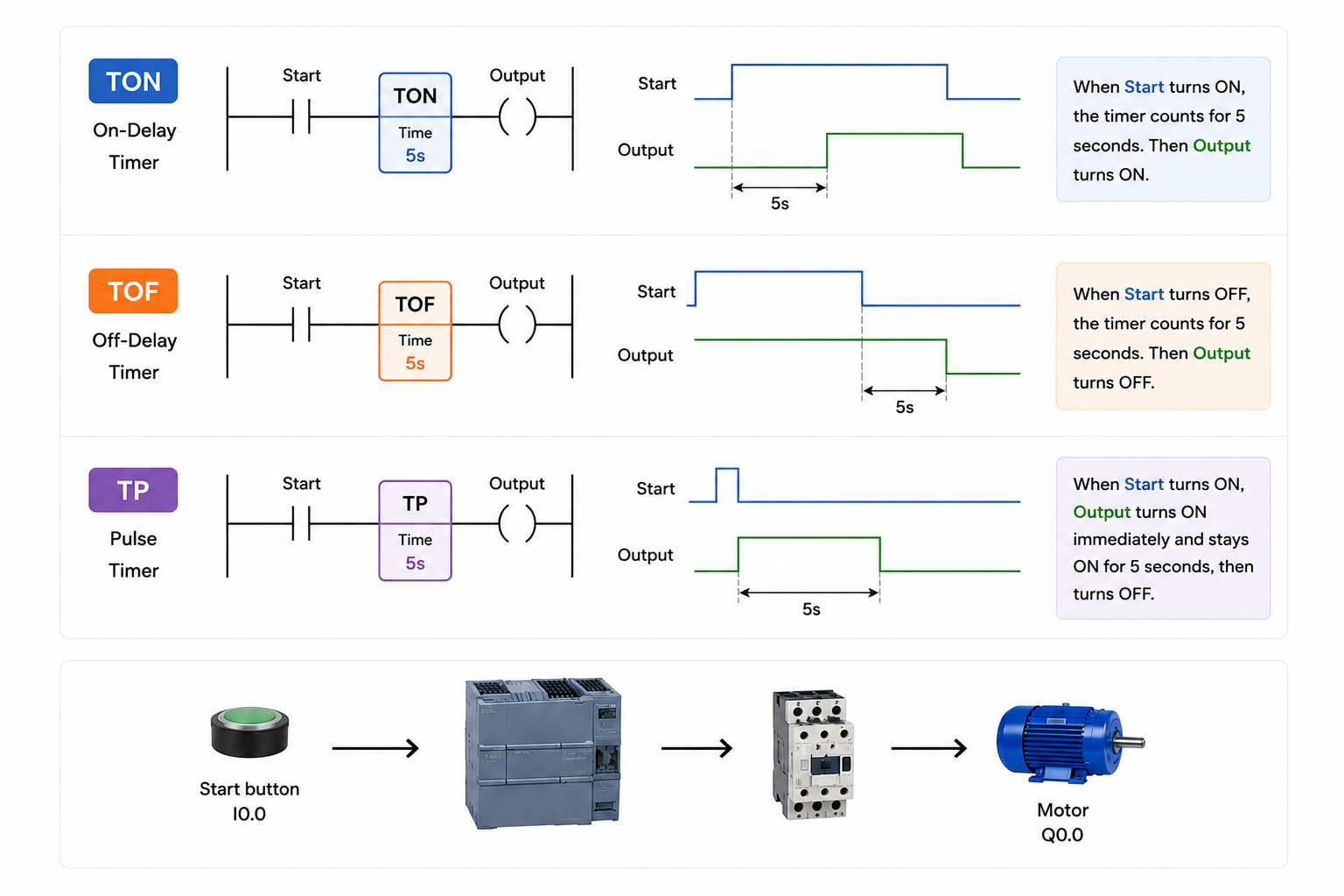
TON: on-delay timer
A TON timer, often called an on-delay timer, starts timing when its input condition becomes true. When the preset time has elapsed, the timer done bit becomes true. If the input condition goes false before the preset time is reached, the timer resets.
Condition true
The rung or input to the timer becomes true.
Timer counts
The elapsed time increases towards the preset value.
Done bit true
The program can use the done bit to switch an output or move to the next step.
Example: a motor starter may only energise after a guard signal has been healthy for two seconds. The delay helps prevent the machine reacting to a quick bounce or unstable input.
TOF: off-delay timer
A TOF timer, often called an off-delay timer, keeps its output true for a set time after the input condition goes false. It is useful when something needs to stay on briefly after a command is removed.
Example: a cooling fan may continue running for ten seconds after a machine stops. The stop command has been removed, but the fan output stays on until the off-delay has finished.
TP: pulse timer
A TP timer creates a pulse for a defined time. When the trigger condition occurs, the timer output turns on for the preset duration. This is useful when the PLC needs a controlled one-shot action rather than a continuous output.
Example: a buzzer could sound for one second when a fault is detected, or a lamp could flash for a fixed time after an operator presses a button.
Common beginner timer mistakes
Common beginner mistakes
- Expecting a timer to work if the rung only goes true for one PLC scan. Most delay timers need the condition to stay true long enough to reach the preset.
- Using the wrong timer type. A start delay usually needs TON, while a run-on delay usually needs TOF.
- Forgetting to reset or control the condition that drives the timer.
- Assuming the timer itself switches the real device. The timer provides status bits or values that your logic then uses to control outputs.
Where timers are used in real automation
In real projects, timer values should be chosen for the process, tested safely and documented clearly. A timer is simple, but the effect on the machine can be important.
Frequently asked questions
What is a PLC timer?
A PLC timer is a software instruction that measures time inside the PLC program and provides a timed result for the logic to use.
What is the difference between TON and TOF?
TON delays an action turning on. TOF delays an action turning off after the input condition has gone false.
What does TP mean in PLC programming?
TP normally refers to a pulse timer. It creates an output pulse for a set duration after a trigger condition.
Do PLC timers keep running when the PLC is stopped?
A normal timer instruction depends on the PLC program running. Behaviour after stop, power loss or restart depends on the PLC, timer type and how the program is written.
Are timer values exact?
PLC timers are accurate enough for normal control tasks, but they are still affected by the controller, scan behaviour and program structure. Safety-critical timing should use correctly rated safety hardware and validated design.